---
title: How to use Speed Mode for Faster Proofing
description: Here you will learn how to use Pozotron's HotKeys to speed up your proofing.
---
[Skip to content](https://support.pozotron.com/helpcenter/speed-mode-the-fastest-way-to-proof-your-chapter#main-content)
[](https://www.pozotron.com)
Open main navigation
Close main navigation
- [Contact Us](https://support.pozotron.com/helpcenter/contact-pozotron)
[Contact Us](https://support.pozotron.com/helpcenter/contact-pozotron?hsLang=en)
Hello. How can we help you?
- There are no suggestions because the search field is empty.
1. [Pozotron Help Center](https://support.pozotron.com/helpcenter?hsLang=en)
2. [Proofing & Editing](https://support.pozotron.com/helpcenter/proofing-editing?hsLang=en)
3. [Annotations](https://support.pozotron.com/helpcenter/proofing-editing?hsLang=en#annotations)
# How to use Speed Mode for Faster Proofing
## Here you will learn how to use Pozotron's HotKeys to speed up your proofing.
Follow these steps, or watch the short video below to walk you through how to use **Speed Mode** in Pozotron!
There are a number of HotKeys, or keyboard shortcuts, that you can use on Pozotron's proofing page.
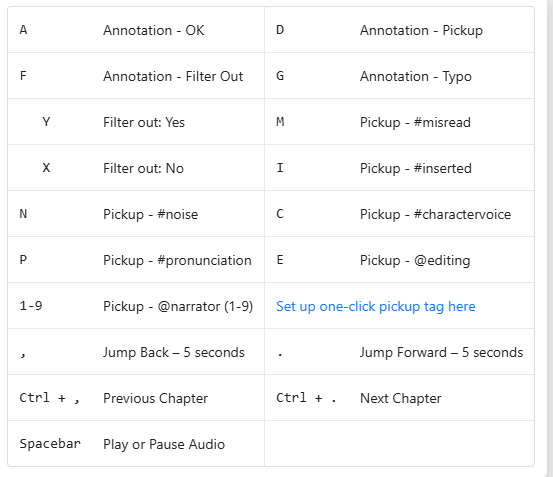
You can use these HotKeys when you have an annotation **selected** on the proofing page.
If an annotation is selected, you'll see it highlighted in **yellow**.
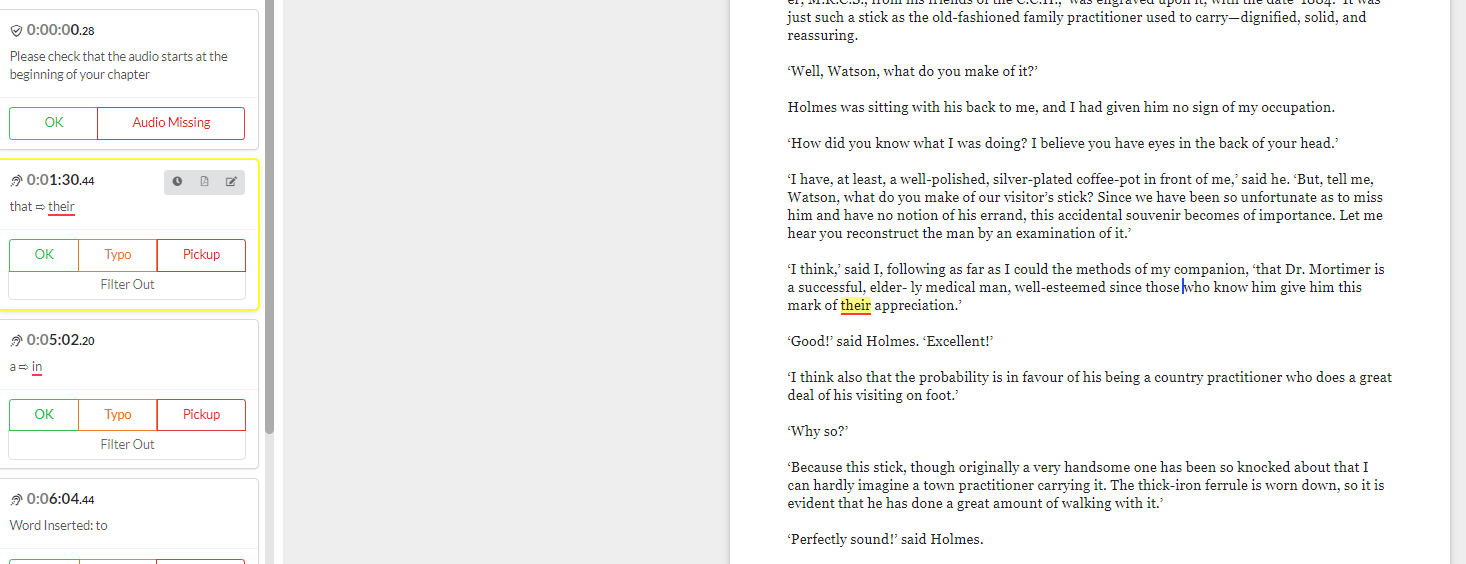
Press **Space** to listen to the audio for this annotation.
Depending on what you hear, you'll want to mark it as a **pickup, typo, OK, etc**.
Use the keyboard shortcut to mark it!
Once you've marked the annotation, Pozotron will automatically move to the next annotation on the list.
Repeat the process until you reach the end of the chapter!
Still need help? Contact us at **help@pozotron.com**
- [Getting Started](https://support.pozotron.com/helpcenter/getting-started?hsLang=en)
- [Proofing & Editing](https://support.pozotron.com/helpcenter/proofing-editing?hsLang=en#main-content)
- [General](https://support.pozotron.com/helpcenter/proofing-editing?hsLang=en#general)
- [Pickup Packet](https://support.pozotron.com/helpcenter/proofing-editing?hsLang=en#pickup-packet)
- [Manual Edits](https://support.pozotron.com/helpcenter/proofing-editing?hsLang=en#manual-edits)
- [Annotations](https://support.pozotron.com/helpcenter/proofing-editing?hsLang=en#annotations)
- [DAW Markers](https://support.pozotron.com/helpcenter/proofing-editing?hsLang=en#daw-markers)
- [Proofing Report](https://support.pozotron.com/helpcenter/proofing-editing?hsLang=en#proofing-report)
- [Other Export Features](https://support.pozotron.com/helpcenter/proofing-editing?hsLang=en#other-export-features)
- [Advanced Features](https://support.pozotron.com/helpcenter/proofing-editing?hsLang=en#advanced-features)
- [Script Preparation](https://support.pozotron.com/helpcenter/script-preparation?hsLang=en#main-content)
- [General](https://support.pozotron.com/helpcenter/script-preparation?hsLang=en#general)
- [Pronunciation Guide](https://support.pozotron.com/helpcenter/script-preparation?hsLang=en#pronunciation-guide)
- [Character Voice Guide](https://support.pozotron.com/helpcenter/script-preparation?hsLang=en#character-voice-guide)
- [Scan Occurrences](https://support.pozotron.com/helpcenter/script-preparation?hsLang=en#scan-occurrences)
- [Export Marked-Up Script](https://support.pozotron.com/helpcenter/script-preparation?hsLang=en#export-marked-up-script)
- [Sharing & Collaboration](https://support.pozotron.com/helpcenter/sharing-collaboration?hsLang=en#main-content)
- [Advanced Features](https://support.pozotron.com/helpcenter/sharing-collaboration?hsLang=en#advanced-features)
- [Post Production](https://support.pozotron.com/helpcenter/post-production?hsLang=en)
- [Troubleshooting](https://support.pozotron.com/helpcenter/troubleshooting?hsLang=en)
- [Pricing & Billing](https://support.pozotron.com/helpcenter/pricing-billing?hsLang=en#main-content)
- [Billing](https://support.pozotron.com/helpcenter/pricing-billing?hsLang=en#billing)
- [Pricing](https://support.pozotron.com/helpcenter/pricing-billing?hsLang=en#pricing)
- [Profile & Settings](https://support.pozotron.com/helpcenter/profile-settings?hsLang=en)
- [Security & Privacy](https://support.pozotron.com/helpcenter/security-privacy?hsLang=en)
- [Affiliate Program & Referals](https://support.pozotron.com/helpcenter/affiliate-program-referals?hsLang=en)
- [Feature Releases](https://support.pozotron.com/helpcenter/feature-releases?hsLang=en)
- [Contact Us](https://support.pozotron.com/helpcenter/contact-us?hsLang=en)
[.png?width=175&height=92&name=Poz_google_ad_pic_transparent%20(1).png "Pozotron Logo")](https://www.pozotron.com)
[Pozotron Help Centre](https://support.pozotron.com/helpcenter?hsLang=en)
Copyright © 2025, Pozotron, Inc.